
Git is a file system?
The way that Git is usually learned and used is through the CLI commands and what their outcomes are. In other words, we interact with the “porcelain” part while the “plumbing” part makes the actual stuff happen, behind abstractions.
To actually grasp how Git works, why it is the default version control system for a long time and why it got developed in the first place, we need to take a little look into the history and get down to the nitty gritty of Git.

Why was Git developed in the first place?
From 1991 to 2002, the Linux kernel development did not include any version control system. Changes were exchanged as patches (diffs) via e-mail and tarballs for releases.
In 2002, Linux kernel project began using a proprietary distributed version control system called BitKeeper. Since it was a proprietary tool and came with its own license, some people had concerns - including Richard Stallman and Alan Cox - about the choice. But since it was the best tool for the job - according to our beloved dictator Linus Torvalds - it was adopted.
In April 2005, kernel developer Andrew Tridgell - who refused to agree to the license - reverse engineered the BitKeeper protocol and released a client tool which allows to retrieve source code metadata from BitKeeper servers, without a BitKeeper license (for more drama: “Torvalds knifes Tridgell”, LWN article about reverse engineering).
This led to a series of events in which BitMover announced that it would stop providing a version of BitKeeper free of charge to the community. Later on Linus said: “I’m not going to touch Linux until I have a replacement for BitKeeper.” after the 2.6.12-rc2 release.
The new replacement had to be:
- Fully distributed
- Supporting non-linear development (parallel branches)
- Able to handle large repositories efficiently (speed and data size)
- Ensuring integrity against data corruption
None of the existing alternatives were really meeting these requirements, therefore Linus thought that they could develop something better than anything else out there in 2 weeks, and Git was eventually born.
A brilliant article on the Brachiosoft Blog explains the series of events in-depth: https://blog.brachiosoft.com/en/posts/git/
Objects
Git is basically a content-addressable file system with a version control system interface written on top.
What does that mean? In a normal file system, data is addressed by location (e.g. /home/dogukan/project/main.c). In Git, data is addressed by a key derived from the data itself (a.k.a. SHA-1 hash).
In this content-addressable collection of “objects”, objects may refer to other objects by referencing their SHA-1 hash; therefore a hierarchy of objects can be formed.
This hash-based addressing mechanism brings some benefits:
- For identical files, content is stored exactly once, since it hashes to the same object.
- Data corruption on objects is detectable, because if data changes, the new hash does not match its address.
Objects are immutable and never edited. Changes in contents result in creation of a new object with a new hash; the old one stays. Every piece of content ever added is somewhere in the object database.
To be able to store objects as compactly as possible in data size, zlib is used (which itself implements the DEFLATE algorithm) to achieve lossless, fast, and standardized data-compression.
Let’s take a look at object types which we can later use to form a hierarchy.
Blob object
Contents of files are stored as blobs. Names and modes of the files are not stored in the blob (remember, content-addressing).
Therefore, if there are multiple files in the repository whose contents are identical (even if they have different names and permissions), Git will only store the blob once.
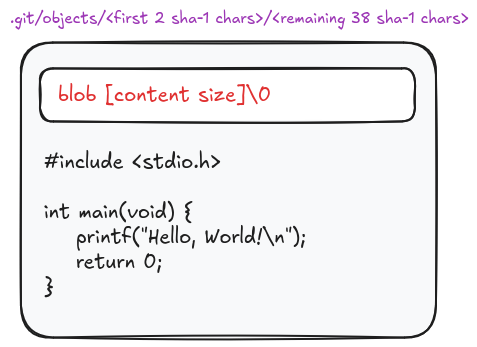
As an example, contents of hello_world.c in a raw blob object look like:
blob 84\x00#include <stdio.h>\n\nint main(void) {\n printf("Hello, World!\\n");\n return 0;\n}\n
Tree object
Directories in a normal file system correspond to trees in Git’s object database.
A tree is a list of sub-trees and blobs that the tree contains.
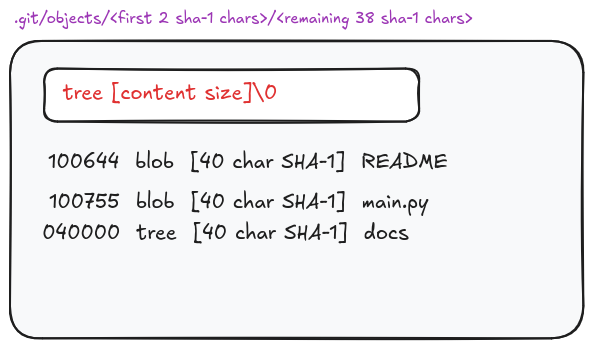
In each row it contains:
- Object mode: The leading 100/120/040/160 prefix encodes the object kind (Git’s internal take on UNIX file types); the trailing 644/755 is the permission part.
- The permissions here look like UNIX permissions, but they’re actually restricted to only 644 and 755.
- Object type: Type of the referenced object (blob | tree | commit)
- Hash: SHA-1 hash of the referenced object
- Name: File or sub-directory name
| Object mode | Meaning |
|---|---|
| 100644 | blob - non-executable file |
| 100755 | blob - executable file |
| 120000 | blob - symbolic link |
| 040000 | tree - directory |
| 160000 | commit - submodule / gitlink |
Commit object
A commit object is basically a snapshot; it points to a top-level tree at a specific time, and thereby the repository state is recorded. So they create a notion of history.
It specifies the top-level tree for the snapshot; the parent commits if any; the author/committer information (with timestamp and time zone), and the commit message.
Timestamp format is “Unix time”. It represents seconds since the epoch (01-01-1970 00:00:00 UTC).
Time zone represents the offset from UTC (±HHMM). For example, UTC−7 would be -0700
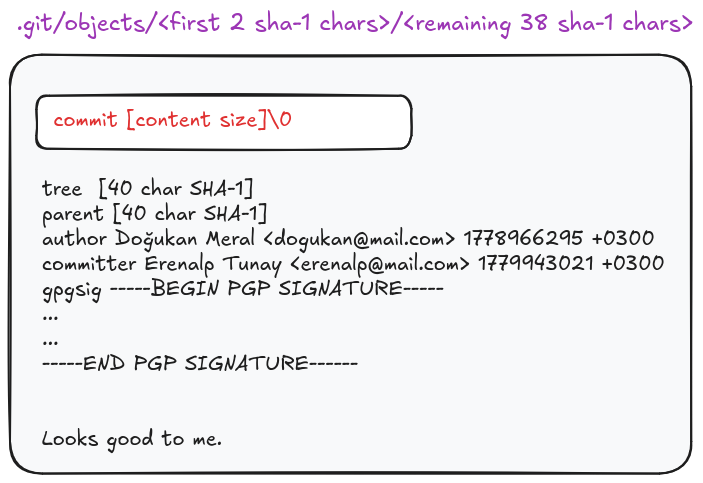
It can also include an armored PGP signature of that commit in gpgsig field. The signature covers the entire commit payload excluding the gpgsig field itself (chicken-egg problem). The gpgsig header is inserted afterwards, and the commit’s SHA-1 does include the signature bytes.
Tag object
Tag is an object that points to another object to label it in the history permanently.
Since Git’s object database is content-addressed, refering to objects (mostly commits) of a specific time by their SHA-1 hashes is not very human-friendly. Tags give history human-meaningful names.
Any of Git’s four object types can be tagged (commit, tree, blob, or even another tag), but tagging a blob/tree/tag is very rare.
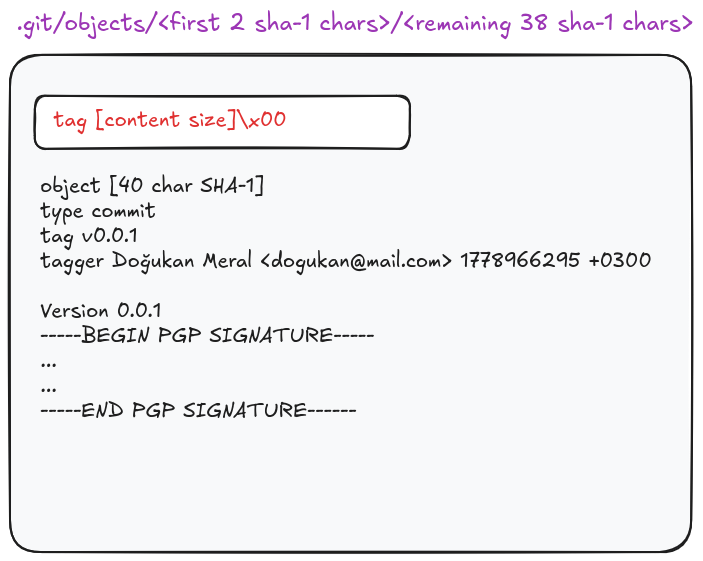
Unlike the commit object’s
gpgsigheader, PGP signature is located at the end of the tag. It is optional in tag as well.
References (refs)
While Git objects - which are immutable - are used to store data, structure, and history; references are used as pointers to specific objects, holding the SHA-1 hash of the object.
References are identified by their names, therefore they are much more pleasant and human-friendly to use when referring to a specific object rather than using the SHA-1 hash value of the object.
A ref is just a plain text file inside .git/refs/ directory, containing a 40-character SHA-1 of the object it points to.
Let’s take a look into different types of these “object pointers” and how they construct new functionalities in Git.
Branch references
A branch in Git (from a file system viewpoint) is simply a reference in .git/refs/heads directory, holding the SHA-1 of the tip commit of a line of work.
Every new commit made on that branch moves the reference; the currently referenced commit becomes the parent of the new commit, then the ref is updated to the new commit.
This mechanism is actually what makes Git more efficient than pre-existing VCS’s for branching and merging. Only the references (pointers) are changed but the underlying big-and-bulky objects stay as they are.
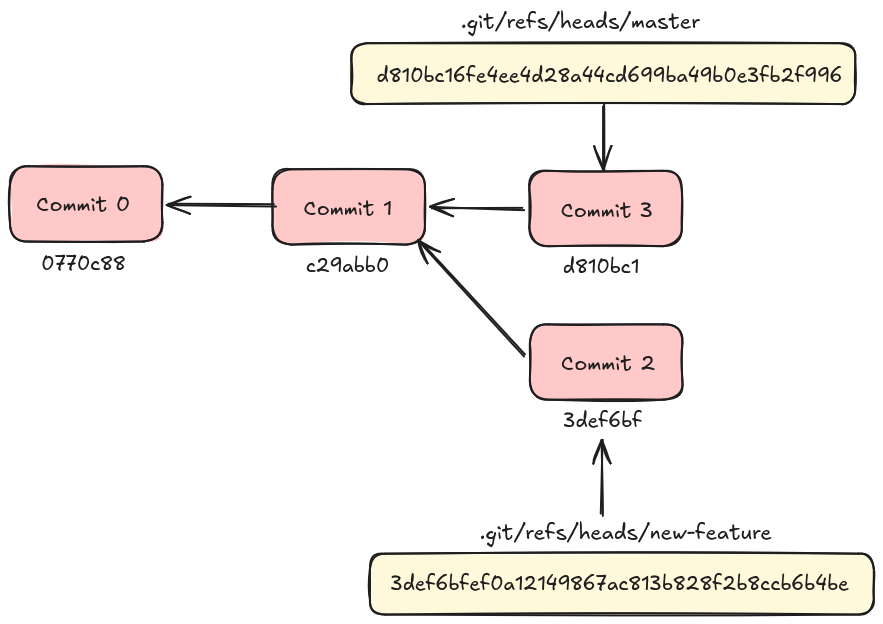
Branching and merging strategies are a whole other topic, which is broad and detailed; deserving its own blog post.
HEAD
HEAD is a reference to the current commit (which will become the parent of new commit), located at .git/HEAD.
If it points to the tip commit (branch); then it contains a reference to a branch reference:
$ cat .git/HEAD
ref: refs/heads/master
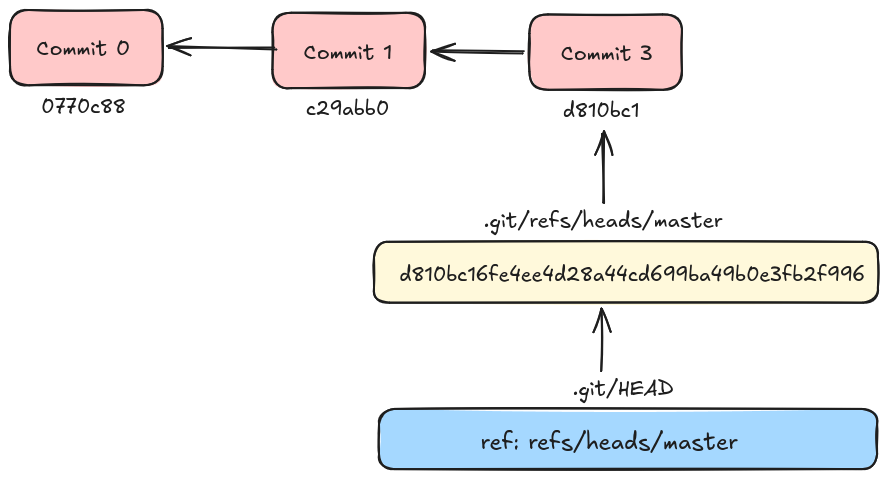
But if it points to some other commit (with git checkout) which has no branch reference; then it stores the commit’s SHA-1 hash directly (a.k.a detached state):
$ git checkout c29abb0
$ cat .git/HEAD
c29abb038b005df55475f53adc8b40cc7740eb68
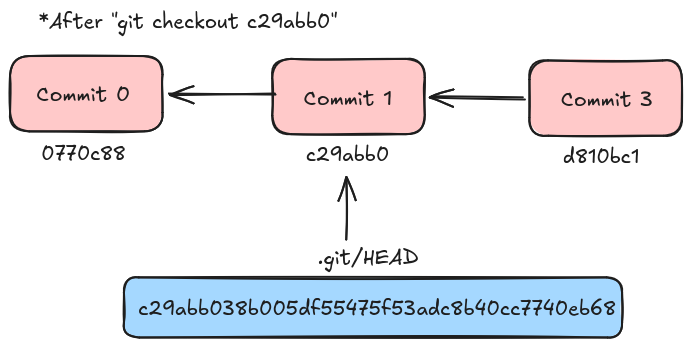
Tag references
There are 2 types of tags in Git:
- Lightweight tag: Only a reference pointing at an object
- Annotated tag: The tag object, contains tag related information as discussed earlier
- After the creation of the tag object, Git also writes a reference to point to it.
Unlike branch references, when new commits are made, tag references don’t get updated to point to the new commit.
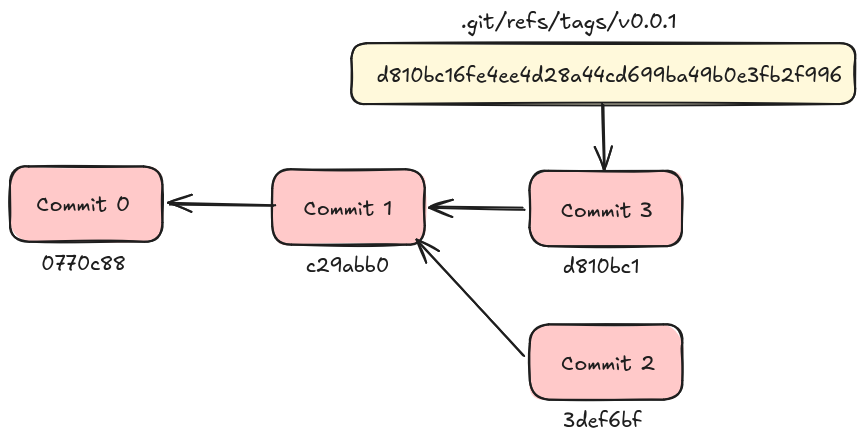
Tags are the only refs that can point at non-commit objects.
Remote references
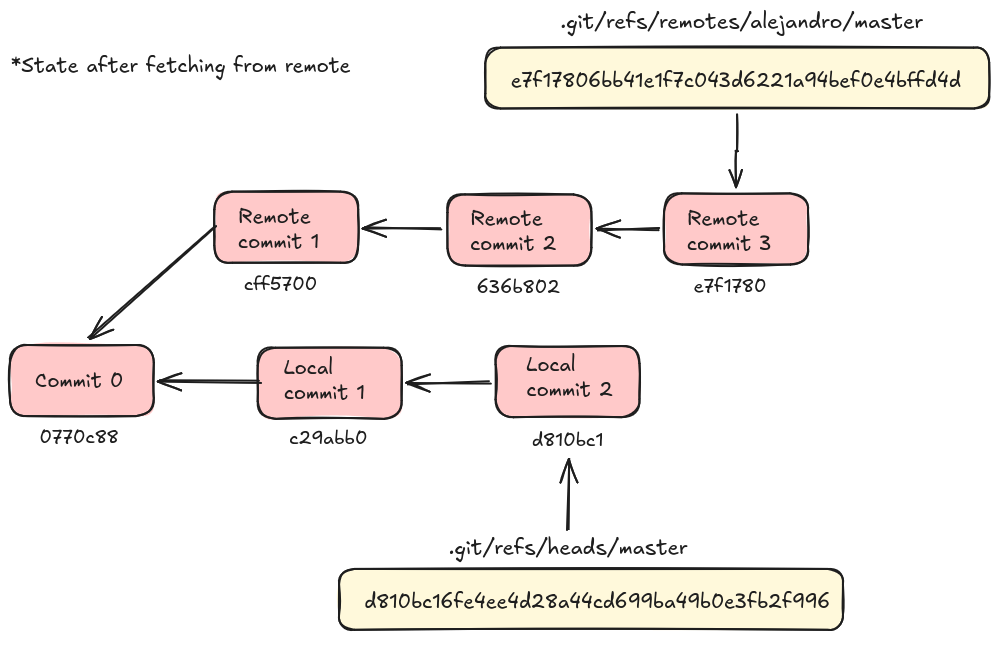
Remote references store the most recently seen commit hash for a remote branch, which resides in another location.
They are read-only which means they can’t be updated with a new commit. They are updated by fetch and push, and are how Git knows if a local branch is ahead or behind a remote branch.
Forming the hierarchy
Enough theory, eh?
Now we can get our hands a little bit dirty and get down to the nitty gritty as I promised. In this part, we will use the classic “porcelain” commands to form the hierarchy - the Git file system - and while doing that, we will examine what is going on in the .git/ directory using “plumbing” commands and some special scripts.
Let’s create a new directory and initialize a Git repository inside:
$ mkdir git-fs-experiment
$ cd git-fs-experiment
$ git init
Initialized empty Git repository in /home/dogumer/git-fs-experiment/.git/
After the initialization, check the files inside .git directory:
$ tree .git
.git
├── config
├── description
├── HEAD
├── hooks
│   ├── applypatch-msg.sample
│   ├── commit-msg.sample
│   ├── fsmonitor-watchman.sample
│   ├── post-update.sample
│   ├── pre-applypatch.sample
│   ├── pre-commit.sample
│   ├── pre-merge-commit.sample
│   ├── prepare-commit-msg.sample
│   ├── pre-push.sample
│   ├── pre-rebase.sample
│   ├── pre-receive.sample
│   ├── push-to-checkout.sample
│   ├── sendemail-validate.sample
│   └── update.sample
├── info
│   └── exclude
├── objects
│   ├── info
│   └── pack
└── refs
    ├── heads
    └── tags

9 directories, 18 files
None of the objects or references which will allow us to form a hierarchy exist yet.
In the theoretical part, I mentioned that Git addresses objects by their content’s SHA-1 hash; therefore if contents of 2 different files in the working directory are the same, Git will store just a single blob. Is it actually the case?
$ echo "file0 content" > file0
$ echo "file0 content" > file0_copy
$ git add file0 file0_copy
$ find .git/objects -type f
.git/objects/66/1c26161d2e1b37ca9ba8277775b80863759faa
There is only 1 object in the database as expected. Let’s decompress the zlib-compressed blob object and take a look inside:
$ python3 -c "import zlib,sys; print(zlib.decompress(sys.stdin.buffer.read()))"  < .git/objects/66/1c26161d2e1b37ca9ba8277775b80863759faa
b'blob 14\x00file0 content\n'
To observe other object types and the relation between them, create a new directory which has a sub-directory and files inside, and then create a commit:
$ mkdir dir0
$ echo "file1 content" > dir0/file1
$ mkdir dir0/dir1
$ echo "file2 content" > dir0/dir1/file2
$ tree
.
├── dir0
│   ├── dir1
│   │   └── file2
│   └── file1
├── file0
└── file0_copy

3 directories, 4 files

$ git add dir0/file1 dir0/dir1/file2
$ git commit -m "first commit"
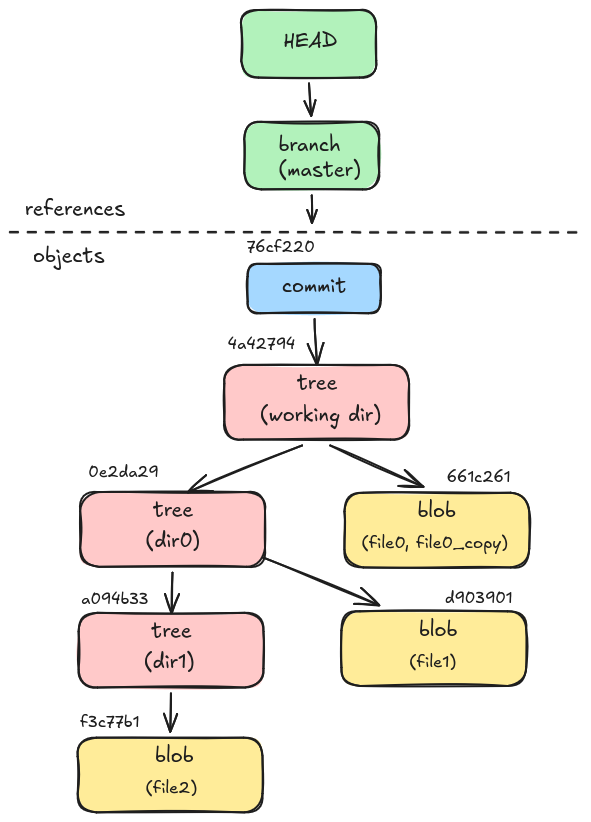
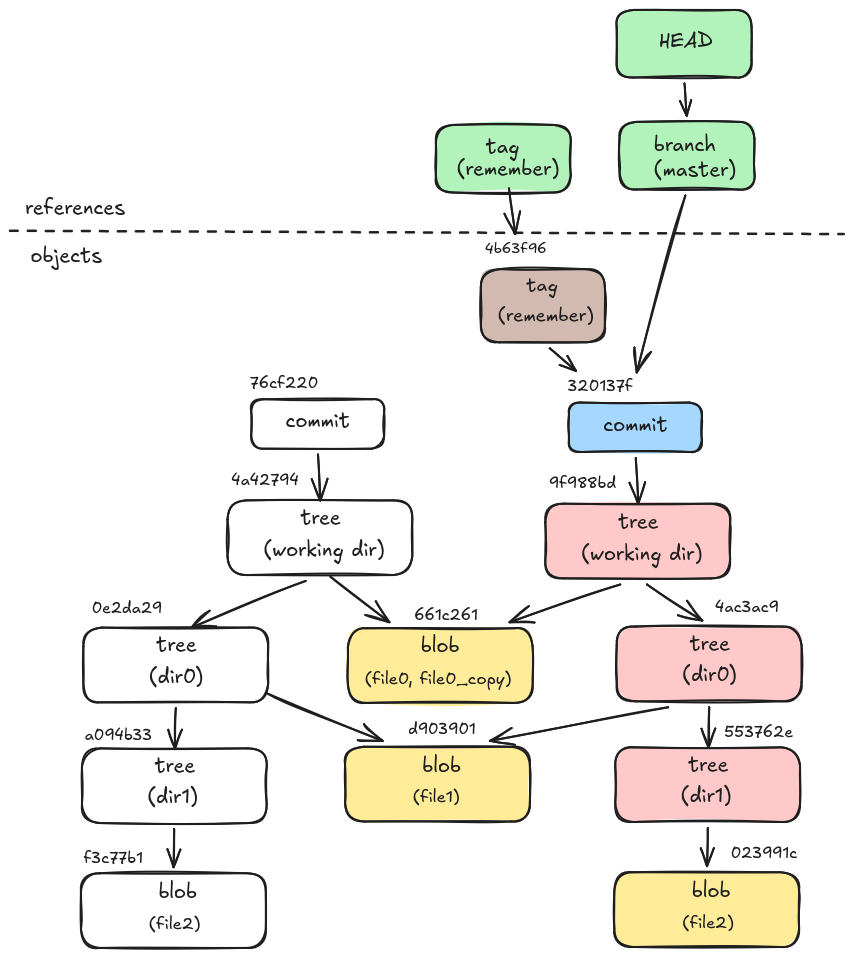
Now with 3 directories - counting the working directory - (trees) and 3 unique file contents (blobs) we must have 6 objects, right? Let’s see if that is the case:
$ git rev-list --objects --all
76cf2204ec5ec133d80b465e7e9b7a3ea5862cfe
4a4279425b4d5b505d9a26daeb708822178e6187
0e2da297d2079b7f0d519aa3f22dbce697fc5677 dir0
a094b33df99df35803cad2327caacb8d43a7148a dir0/dir1
f3c77b12c6c1a59b79d4a86b6e05ea57b1e45d84 dir0/dir1/file2
d9039017ab6c958678a334446aadfe5047266027 dir0/file1
661c26161d2e1b37ca9ba8277775b80863759faa file0
7 ?? Hmm… Oh.. The commit was an object as well! You’re goddamn right. After figuring out what these top 2 hashes correspond to, we can draw the mental image of the Git file system:
$ git cat-file -p 76cf2204ec5ec133d80b465e7e9b7a3ea5862cfe
tree 4a4279425b4d5b505d9a26daeb708822178e6187
author dogukanmeral <dogukan@mail.com> 1788994683 +0300
committer dogukanmeral <dogukan@mail.com> 1788994683 +0300

first commit

$ git cat-file -p 4a4279425b4d5b505d9a26daeb708822178e6187
040000 tree 0e2da297d2079b7f0d519aa3f22dbce697fc5677    dir0
100644 blob 661c26161d2e1b37ca9ba8277775b80863759faa    file0
100644 blob 661c26161d2e1b37ca9ba8277775b80863759faa    file0_copy
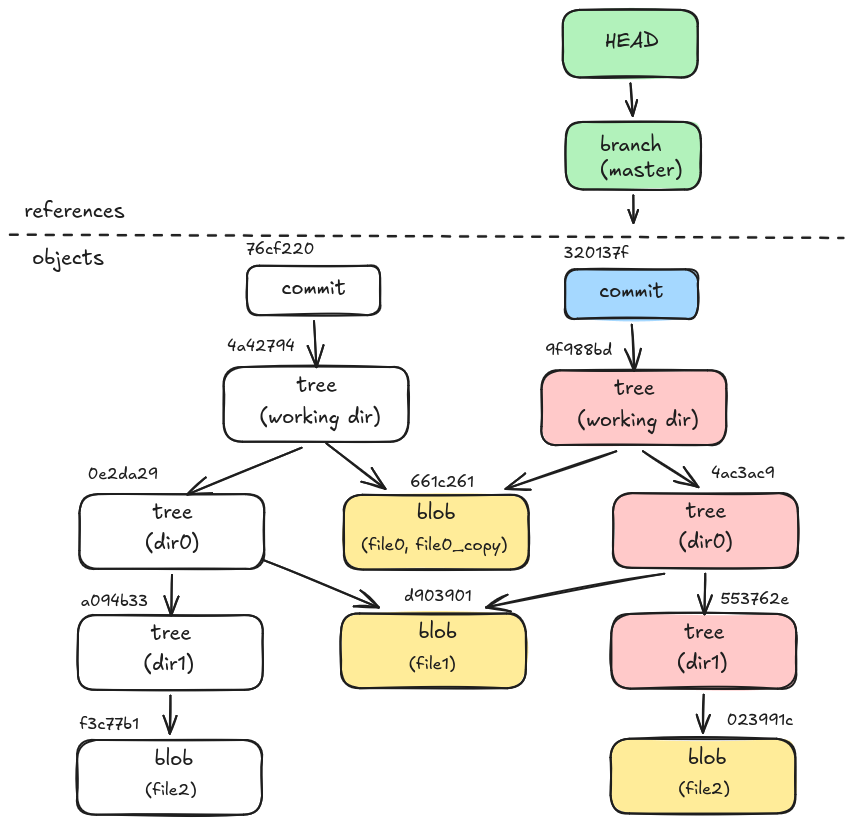
Now let’s assume that we change the dir0/dir1/file2 file and commit again. As we learned in the theoretical part; only a new blob will appear which includes the newest changes and the old blob will continue to stay in the object database.
Right?
$ echo "file2 content but changed" > dir0/dir1/file2
$ git add dir0/dir1/file2
$ git commit -m "second commit"

$ git log --oneline --all
320137f (HEAD -> master) second commit
76cf220 first commit

$ git ls-tree -r -t 320137f
040000 tree 4ac3ac94d744ff622436f8d94d879ad40c5be0dd    dir0
040000 tree 553762e8dd5eae45a7fb490dd4bd0d4d0928fe5f    dir0/dir1
100644 blob 023991c3c93edf61f795ffbe493e1e78dcc2ce83    dir0/dir1/file2
100644 blob d9039017ab6c958678a334446aadfe5047266027    dir0/file1
100644 blob 661c26161d2e1b37ca9ba8277775b80863759faa    file0
100644 blob 661c26161d2e1b37ca9ba8277775b80863759faa    file0_copy
As expected, the new version of dir0/dir1/file2 has a new blob, with the SHA-1 hash of 023991c.
But WAIT! Trees which correspond to dir0 and dir0/dir1 have new and different SHA-1 hashes as well!
Since trees hold hashes of blobs and sub-trees under them, all ancestor trees of the dir0/dir1/file2 blob have changed.
Lovely! Let’s remember this particular snapshot (commit) of our repository forever and give it a name:
$ git tag -a remember -m "lovely times"
$ cat .git/refs/tags/remember
4b63f9669fac9d0ec4cc11a19667e14fb6226345

$ git cat-file -p 4b63f96
object 320137f5dc6f4ad307a03f1b10d0e3eec01459b0
type commit
tag remember
tagger dogukanmeral <dogukan@mail.com> 1368919078 +0300

lovely times
This article is not exhaustive on the whole
.gitfilesystem and some key concepts such as index file and packs are not covered. Since the main focus of this article is to gain the reader a file system perspective on Git, these topics are planned to be explained in later articles.